Part 2: Serial Connection
With a working serial card installed, the next step was connecting the IBM PC to my laptop using a null modem cable and a USB-to-serial adapter.
Hardware Used
I purchased the following hardware:
| Component | Product | Connector |
|---|---|---|
| Null Modem Cable | KENTEK DB9F to DB25F Null Modem Cable | DB-25 Female -> DB-9 Female |
| USB-Serial Adapter | USB to RS232 Adapter | DB-9 Male -> USB |
Cable Chain
IBM PC [DB-25 Male]
   |
   v
Null Modem Cable [DB-25 Female -> DB-9 Female]
   |
   v
USB Adapter [DB-9 Male -> USB]
   |
   v
Laptop
RS-232
There is a lot of information online about the RS-232 standard. I found these links to be quite helpful:
- Tech Stuff - RS-232 Cables, Wiring and Pinouts
- DB9 to DB25 Pinout and Wiring Explained: How RS232 Connections Work
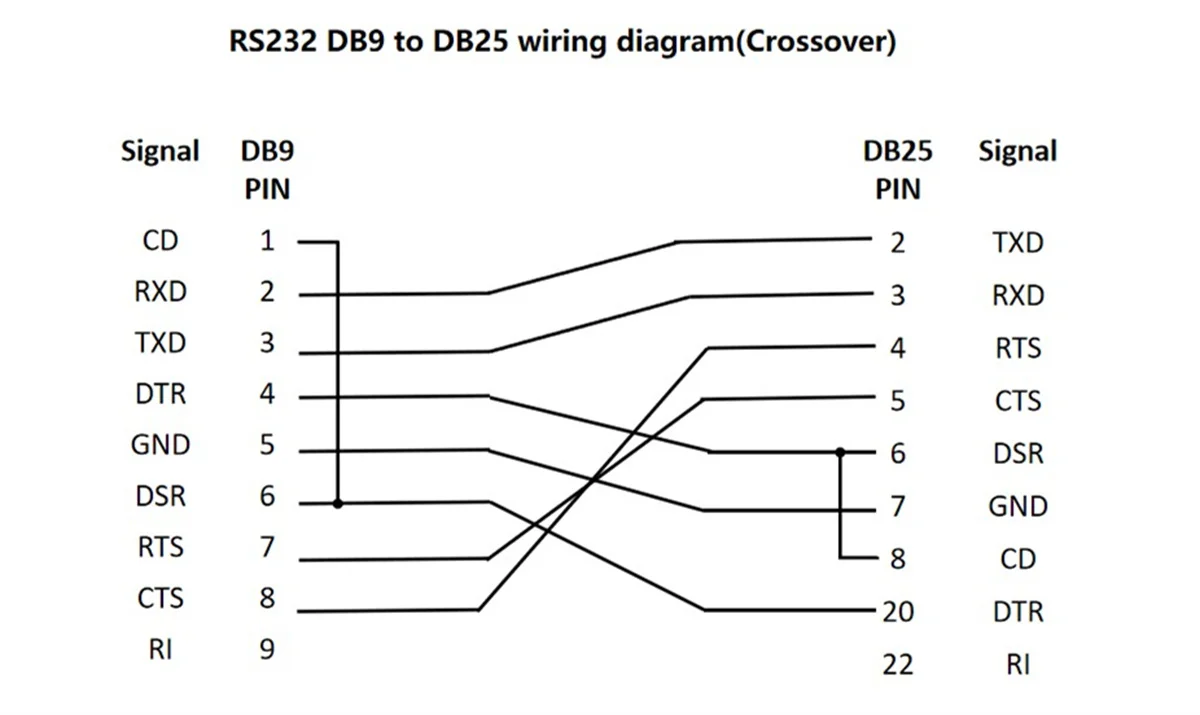
The standard defines different pin assignments for DB-25 and DB-9 connectors. Our goal is to cross the TX (transmit) and RX (receive) pins - which is exactly what a null modem cable does:
DB-25 (IBM PC)              DB-9 (Adapter)
Pin 2 (TxD)  ------------>  Pin 2 (RxD)
Pin 3 (RxD)  <------------  Pin 3 (TxD)
The following diagram shows how a null modem cable maps between the DB25 and DB9 serial interfaces: