Part 3: Bootstrap Text Receiver
Next I needed a program that could run on both the IBM PC and the laptop to transfer data between the two machines. It turns out there are quite a few possibilities, including:
- Kermit (MS-Kermit on the IBM, C-Kermit on the laptop)
- LapLink / FastLynx (requires bootstrapping LL3.EXE or FX.EXE onto the IBM)
- XMODEM via a DOS comms program (requires an XMODEM-capable tool)
- PARCP-USB (requires the special PARCP-USB adapter and a 386+ on the PC side)
- Fastwire II
The IBM actually did have Fastwire installed - so that seemed promising. But when I started it by typing sl at the command prompt it printed "slave ready..." and there didn't seem to be any way to configure its settings or send files.
However, the IBM PC did have GW-BASIC installed. And that was good enough - I could write a small program to copy over one of the programs above from my laptop to the IBM PC.
GW-BASIC
My goal was to copy kermit.bas from my laptop to the IBM, and then use the Kermit program to transfer files.
Skip kermit.bas
Looking back this was the wrong choice. I should have started with transferring a binary file, mskermit.exe. See Part 6 for why.
I didn't remember much about BASIC, except that it had lots of line numbers. To start, you type the command GWBASIC which opens this interface:
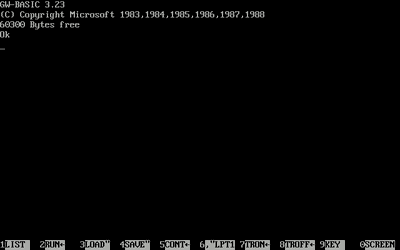
Exit GW-BASIC
To exit GW-BASIC type in SYSTEM.
Then start typing in your program (see receive-text.bas):
10 ON ERROR GOTO 900
20 OPEN "COM1:2400,N,8,1,CS0,DS0,CD0" AS #1
30 OPEN "C:\KERMIT.BAS" FOR OUTPUT AS #2
40 IF LOC(1)=0 THEN 40
50 N = LOC(1): IF N > 32 THEN N = 32
60 A$ = INPUT$(N, #1)
70 PRINT #2, A$;
80 GOTO 40
900 PRINT "ERR=";ERR;" ERL=";ERL
910 RESUME 40
Text Mode Only
This program uses FOR OUTPUT which opens the file in text mode. This causes problems for binary files:
- CR/LF translation occurs
- Ctrl-Z (0x1A) is interpreted as EOF
- Certain byte values get mangled
Binary files require a different approach (see Part 5).
Line-by-Line Explanation
| Line | Code | Purpose |
|---|---|---|
| 10 | ON ERROR GOTO 900 |
Set up error handling |
| 20 | OPEN "COM1:..." |
Open serial port with specified parameters |
| 30 | OPEN ... FOR OUTPUT |
Open output file in text mode |
| 40 | IF LOC(1)=0 THEN 40 |
Wait for data in the serial buffer |
| 50 | N = LOC(1)... |
Get the number of bytes available |
| 60 | A$ = INPUT$(N, #1) |
Read N bytes from serial |
| 70 | PRINT #2, A$; |
Write to file (semicolon prevents newline) |
| 80 | GOTO 40 |
Loop back to wait for more data |
| 900-910 | Error handler | Print error and continue |
Serial Port Parameters
The OPEN "COM1:2400,N,8,1,CS0,DS0,CD0" string breaks down as:
| Parameter | Value | Meaning |
|---|---|---|
| COM1 | - | Serial port 1 |
| 2400 | Baud rate | Bits per second |
| N | Parity | None |
| 8 | Data bits | 8 bits per character |
| 1 | Stop bits | 1 stop bit |
| CS0 | CTS | Ignore Clear To Send |
| DS0 | DSR | Ignore Data Set Ready |
| CD0 | CD | Ignore Carrier Detect |
The CS0,DS0,CD0 parameters disable hardware flow control signals. I found out these were important by trial and error.
Using the Receiver
On the IBM PC
- Start GW-BASIC
- Type in the program (or
LOADif previously saved) RUN
To cancel the program, hit Ctrl+Break, not Ctrl+C. If you run the program from the command prompt, instead of the GW-BASIC shell, it will appear that your computer is hung after the program completes or you hit Ctrl+Break. That caused me to reboot the machine a few times, which is always scary because of the horrendous racket it makes on shutdown. I figured I must be missing something, and in fact I was. As mentioned above, you can type in SYSTEM to get back to a command prompt. Oops.
On the Laptop (with PuTTY)
- Open PuTTY configured for the COM port at 2400 baud
- Copy the
kermit.bassource code and paste it into the PuTTY window by right-clicking - Wait for transfer to complete
- Press Ctrl+Break on the PC to stop the program
Troubleshooting and Pacing
If the receiver prints ERR=57, "Device I/O error", or "communication buffer overflow" on the INPUT$ line, the sender is outrunning GW-BASIC. Common fixes:
- Lower the baud rate (1200).
- Reduce the read chunk size (cap
Nat 16 or 32). - Use a paced sender such as Tera Term "Send file as text" with a delay
- If you see
ERR=75on theINPUT$line, try addingRSto the open string:COM1:2400,N,8,1,RS,CS0,DS0,CD0.
Error handling notes:
- In GW-BASIC,
ERRis read-only, you cannot assign to it. - Use
RESUME 40to return to the wait loop.RESUME NEXTcontinues after a failedINPUT$and can trigger "Resume without error". - If you see gibberish, double-check that both ends have the same baud rate, parity, and data bits. I made this mistake a couple of times.
Success: KERMIT.BAS Transferred
Using PuTTY and receive-text.bas I successfully transferred kermit.bas to the IBM PC.
Next: Part 4: Kermit